Print-size art from
the files you already have.
AI Upscaler Studio takes a whole folder of low-res mockups, prints and stickers and hands it back at exact print dimensions, 300 DPI baked in, in about eight seconds a file on your own NVIDIA card. Nothing leaves your machine.
Microsoft takes the payment, handles VAT and processes refunds.
Signed installer, so no SmartScreen warning. Updates arrive on their own.
The whole app, in seven frames.
No trial to install and no demo to book. These are the screens you will spend your working day in.
Built for the people who actually print.
A local batch image upscaler for Windows, aimed at shops with hundreds of products rather than at someone touching up one holiday photo.
Press-grade speed
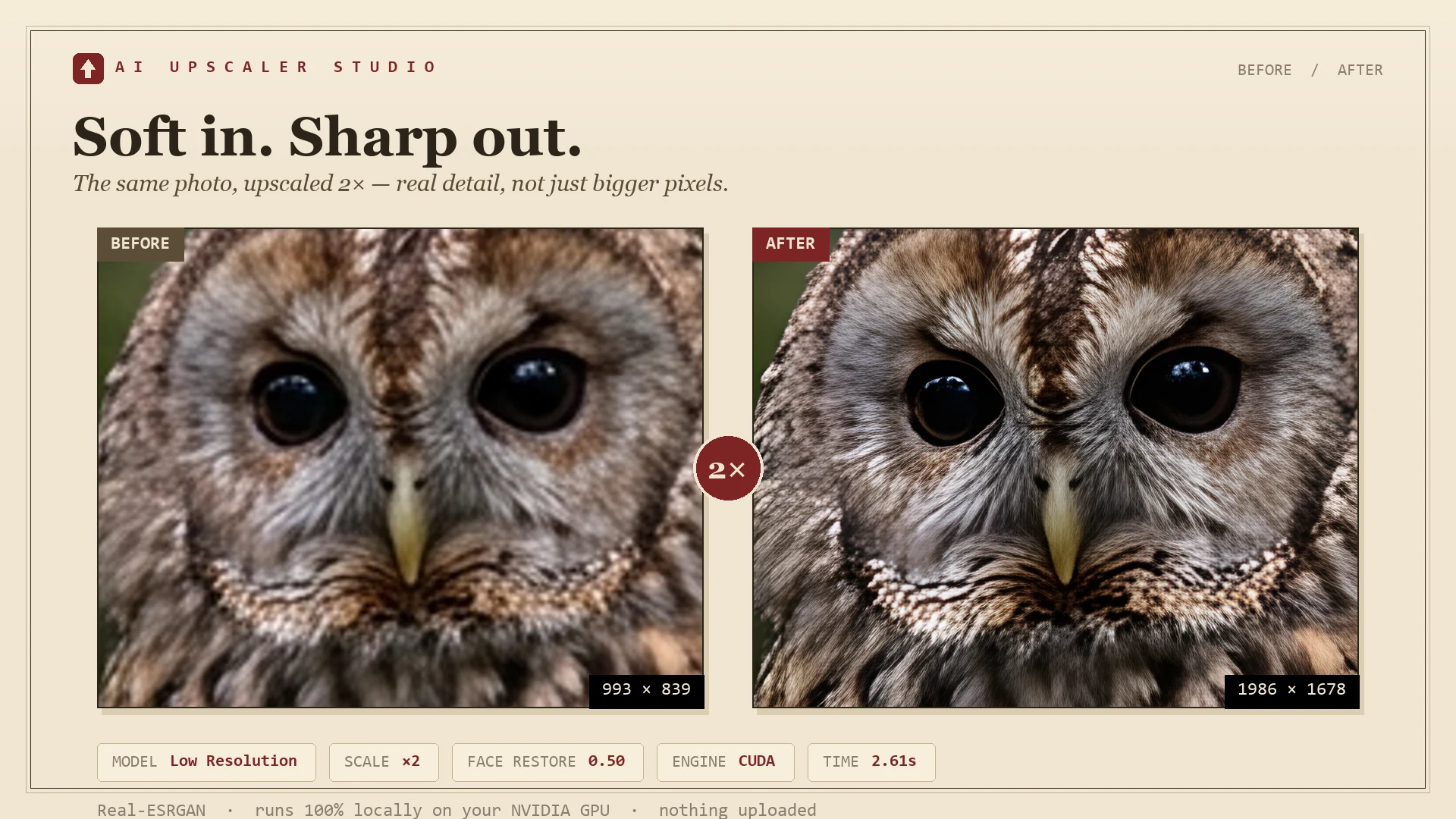
FP16, TF32, torch.compile and 768-pixel tiles. A 1080p mockup reaches 4K in roughly eight seconds on an RTX 3060 Ti, and the next file starts immediately.
A folder at a time
Point it at a directory, set the scale, get an archive back. There is no file cap and nothing to babysit, so a 400-product catalogue is one job rather than 400.
Lands on the exact print size
A continuous 1x to 10x slider plus poster presets from 5 by 7 inches to 24 by 36, A2 and A1. The models render full AI detail through 4x and that result is carried up to your target, with the print-DPI tag written into the file.
Stickers keep their edges
The alpha channel goes through the model on its own pass, so transparent PNGs come back with clean cutlines instead of the serrated edges free tools leave behind.
Three models, three jobs
Low Resolution for compressed source, CGI / Anime for digital art, High Fidelity for photo work where grain matters. Each is a different Real-ESRGAN weight, chosen by intent rather than filename.
It stays on your machine
Nothing is uploaded, so client work and unreleased designs never leave the building. If you would rather borrow someone else's GPU, the optional Replicate cloud route takes your own API key.
Against the usual suspects.
Where a one-time, offline Topaz Gigapixel alternative sits next to Upscayl and the browser-based upscalers.
| Upscayl | Topaz Gigapixel | Online tools | AI Upscaler Studio | |
|---|---|---|---|---|
| What it costs | Free | $99 and up | $10 to $30 every month | $22.49, once |
| Five years of use | Free | $99 plus paid majors | $600 to $1,800 | $22.49 |
| Batch processing | Limited | Yes | Tiered by plan | Whole folder, no cap |
| Free choice of scale every tool renders AI detail to 4x | 2 / 3 / 4 only | Fixed presets | Locked to your plan | 1x to 10x slider |
| Print-size presets with DPI | No | No | No | Yes |
| Transparent PNG | Serrated edges | Yes | Mixed | Alpha through the model |
| Works offline | Yes | Yes | No | Yes |
| Your files stay private | Yes | Yes | Uploaded | Yes |
| Updates | Community | Paid majors | Locked to the sub | Free minors, automatic |
Competitor prices checked September 2026. Upscayl is a good free tool, and for plenty of people it is the right answer.
Will it run on your machine?
This is the one thing worth checking first. AI Upscaler Studio presses at the speed above only on an NVIDIA card, and we would rather tell you now than refund you later.
- NVIDIA GPU with 4 GB of VRAM or more, GTX 1660 / RTX 2060 and newer. Required for local mode.
- Windows 10 or 11, 64-bit.
- 5 GB of free disk space for the app and the model weights.
- Optional: a free Replicate API key for cloud upscaling. No GPU needed, but you pay per image.
- Not supported: AMD, Intel Arc and Mac. These fall back to CPU and run 20 to 60 times slower.
How to check your GPU in ten seconds
Press Ctrl + Shift + Esc, open the Performance tab, and read the list down the left. Every GPU in the machine is named there.
If one of them starts with NVIDIA GeForce, you are good. If you only see AMD Radeon, Intel UHD, Iris or Arc, use the Replicate cloud option instead of buying for local mode.
Laptops with switchable graphics sometimes report the wrong chip in a browser. Device Manager settles it.
Buy once. Upscale forever.
There is one version and one price. No tiers to compare, and no credits to top up.
- Every feature, no upsell
- Unlimited batch size
- Watch-folder mode
- All three AI models
- Poster presets, 300 DPI baked in
- Face restoration for portraits
- AI-processed alpha channel
- Replicate cloud fallback
- Commercial licence, sell what you make
- Free minor updates, forever
- Installs on your Windows devices
- Priority email support
VAT and refunds handled by them No licence keys
Tied to your Microsoft account Local currency
Shown at Store checkout
The ones people ask before buying.
How many machines can I use it on?
The Microsoft Store licence is tied to your Microsoft account, so it installs on the Windows devices you sign in to. There are no licence keys to keep track of and no activation limit to hit at the worst moment.
What hardware do I need?
Windows 10 or 11 with an NVIDIA GPU carrying at least 4 GB of VRAM, GTX 1660 or RTX 2060 and up. Without an NVIDIA card the app falls back to CPU and runs 20 to 60 times slower, so use the built-in Replicate cloud option with your own free API key instead.
Why does the slider go to 10x if the models are 4x?
Because those are two different jobs. The three Real-ESRGAN models each render 4x of genuine new detail, and above that the 4x result is carried up to the exact size you asked for. No tool invents detail past 4x, whatever the marketing says. What the slider buys you is landing on an exact print dimension instead of the nearest preset.
Can I sell what I make with it?
Yes. The outputs are yours. The licence covers personal, freelance and commercial use, including selling prints on Etsy, print-on-demand platforms and your own shop.
How does it compare to Topaz Gigapixel?
Topaz is the premium option at $99 and up, and it is genuinely excellent. AI Upscaler Studio is faster on batch jobs, costs about a quarter as much, runs as a local web app rather than a heavy desktop binary, and handles transparent PNGs more cleanly. If your work is single images with careful photographic tuning, Topaz is the better buy.
Will my licence expire?
No. One-time purchase, lifetime use, free minor updates that arrive on their own through the Store. If a major version ever ships with something big like video, it will be optional and discounted for existing owners.
Which AI model is under the hood?
Real-ESRGAN, running locally on your GPU. Three pretrained weights are bundled: Low Resolution (RealESRGAN x4plus) for compressed source, CGI / Anime (x4plus_anime_6B) for digital art, and High Fidelity (RealESRNet x4plus) for photo work where grain and texture beat maximum sharpness. All open source, and trained on synthetic degradation rather than scraped image sets, so there is no training-data licensing mess attached to your output.
How do refunds work?
Purchases run through the Microsoft Store, so refunds follow Microsoft's refund policy. Request one from Order history in your Microsoft account. If the problem is the app rather than the purchase, write to us through the support form and we will sort it out.
Is there a Mac or Linux version?
Windows only for now. Mac and Linux are on the roadmap if enough people ask to justify the port.
Stop rejecting your own artwork
for being too small.
Buy it once, and the next low-res file in your archive becomes a print you can sell.
Get it on Microsoft Store $22.49 once · Windows 10 / 11Not sure yet? Ask.
Hardware, licences, refunds, or whether it will handle the particular mess your source files are in. We reply by email, usually within a day.